
🎮 Sprite & Animation in 2D Games
TL;DR: A sprite is a 2D image representing a character or object in a game, while animation is a sequence of sprites joined together to create the illusion of movement. This is the foundational technique of every 2D game — from classic pixel art to modern hand-drawn animation.
When Mario runs across the screen, the brain doesn’t actually see “movement” — it sees a sequence of static images displayed fast enough to create that illusion. This is the core principle of Sprite Animation, a technique the 2D game industry has used since the arcade era of the early 1970s and is still prevalent today in modern Indie games.
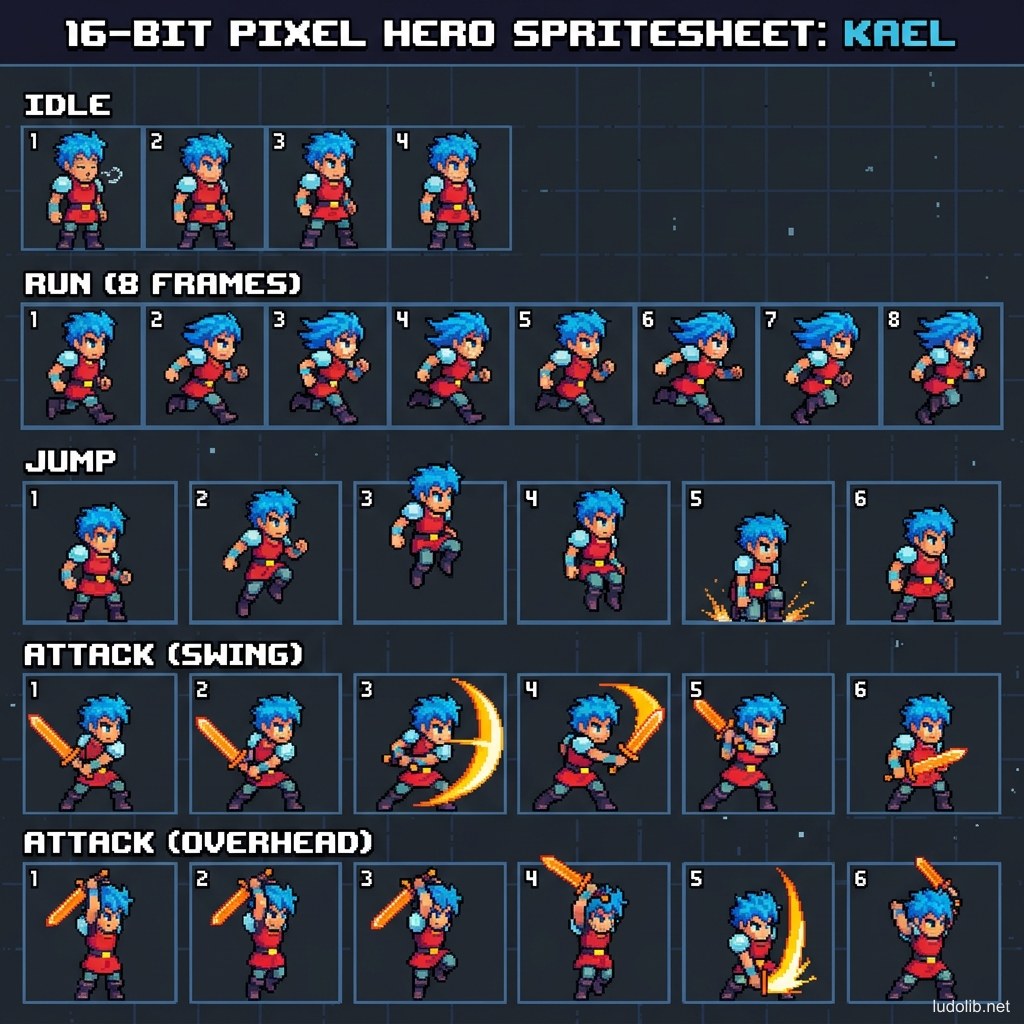
Core Concepts
| Term | Definition |
|---|---|
| Sprite | A single 2D image representing one state of a character/object |
| Sprite Sheet | A compiled table of multiple sprites on a single image file for memory optimization |
| Frame | A single sprite in the animation sequence |
| FPS (Frames Per Second) | Number of frames displayed per second — 2D games typically use 8-24 FPS for character animation [S1] |
| Hitbox | Invisible collision zone attached to the sprite, not necessarily 100% matching the drawn shape |
Operating Principles
Animation Loop
Most basic character states are designed as loops — frame sequences that repeat seamlessly:
- Idle loop: 4-8 frames of light breathing, ear wiggling, clothing fluttering.
- Run loop: 6-12 frames of one running step cycle.
- Attack: Non-looping frame sequence — plays once then returns to Idle.
Sprite Atlas & Texture Packing
In the modern technical pipeline, Sprite Sheets are packed into Texture Atlases — one large image file containing multiple characters/objects. This technique significantly reduces the number of times the GPU must access memory (draw calls), directly improving Frame Rate [S2].
Skeletal 2D Animation
Rather than drawing frame by frame, modern technique allows drawing individual body parts (arms, legs, head) and attaching them to a digital skeleton. Popular tools: Spine, Dragonbones, Unity 2D Animation. This approach saves the cost of redrawing each frame, but trades off for a more mechanical feeling compared to pure Hand-drawn 2D.
Game Examples
- Hollow Knight (Team Cherry) — All characters use traditional hand-drawn sprites frame by frame, creating the characteristic fluid and organic feeling. The main character has over 100 separate animation frames [S3].
- Dead Cells (Motion Twin) — Combines high-quality 2D sprites with pixel lighting techniques in a 2.5D environment — creating impressive depth effects from flat sprites.
- Street Fighter II (Capcom, 1991) — Established the gold standard for Sprite Animation in fighting games: each character has hundreds of frames stored on multiple separate ROM chips due to hardware limitations of the era [S1].
Trade-offs
| Aspect | Content |
|---|---|
| ✅ Advantages | Flexible artistic style — from pixel to hand-drawn. Lower cost than 3D. Easy to control frame quality step by step. |
| ❌ Disadvantages | Number of frames to draw increases non-linearly when adding new animations. Hard to rotate characters at multiple angles (typically requires redrawing everything for each direction). |
| ⚠️ Common Pitfall | ”Frame Budget” — team draws too much detail per frame, causing production costs to exceed plan. Prioritize animation for most frequently encountered states first. |