
🦴 Skeletal Animation & Rigging in 3D Games
TL;DR: Rigging is the process of attaching a digital skeleton to a 3D model, while Skeletal Animation is the technique of creating movement by rotating and translating those bone joints over time. This is the foundation of every 3D character system in games — from simple running and jumping to complex facial expressions.
When a character in a game bends down to pick up an item, the arm extends and the back curves — the character’s skin mesh doesn’t actually “know” how to move. What actually controls it is an invisible skeleton inside, and the skin mesh simply follows those bones at pre-calculated influence ratios. This is the core principle of Skeletal Animation.
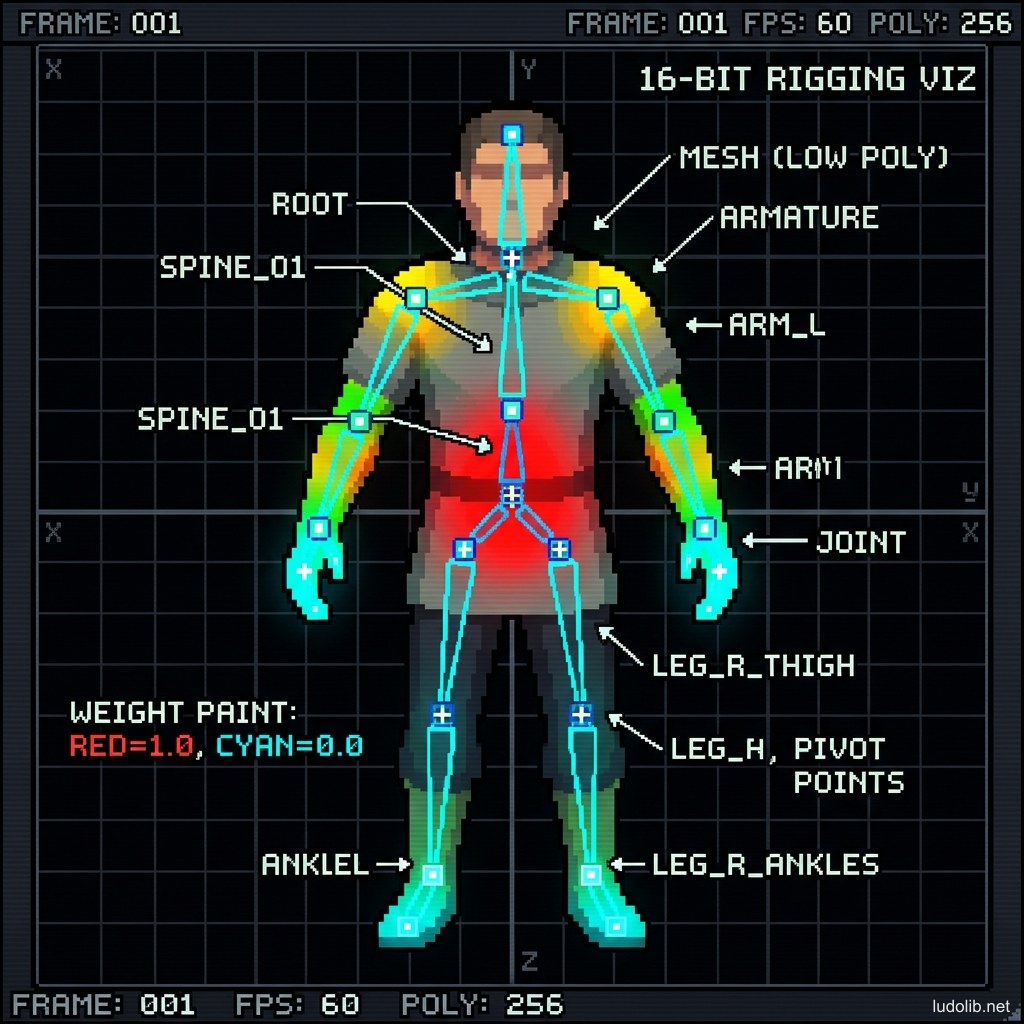
Core Concepts
| Term | Definition |
|---|---|
| Bone / Joint | A single bone in the rig — has no actual shape, only a pivot point and direction |
| Rig / Skeleton | The complete bone system of a character |
| Skinning / Weight Painting | Process of determining what percentage each mesh vertex is influenced by each bone |
| IK (Inverse Kinematics) | Reverse calculation: place the hand at a position → engine automatically calculates arm and shoulder angles |
| FK (Forward Kinematics) | Forward control: animator rotates each joint from root to tip in sequence |
| Blend Shape / Morph Target | Direct mesh deformation, bypassing bones — used for facial animation |
Operating Principles
Animation State Machine
In games, characters don’t just run a single animation — they continuously transition between states (Idle → Walk → Run → Jump → Fall → Land). The Animation State Machine (or Animator Controller in Unity) manages these transitions according to logic conditions from gameplay [S1].
Motion Capture vs. Keyframe Animation
Two methods for creating game character animation [S2]:
| Method | Process | Advantages | Disadvantages |
|---|---|---|---|
| Motion Capture (Mocap) | Actors wear suits with sensors, movements recorded directly | Natural, fast for large animation volumes | High studio cost, hard to edit after capture |
| Keyframe Animation | Animators manually set poses at key frames, software interpolates between | High creative control, lower cost | Slower, requires high animator skill |
AAA games typically combine both: mocap for basic locomotion, keyframe for special or gameplay-critical animations.
Procedural Animation
Rather than animators manually creating each animation, Procedural Animation calculates movement in real-time based on context [S3]:
- Feet automatically adjust to uneven terrain (foot IK).
- Character eyes automatically track moving objects (look-at IK).
- Clothing/hair automatically swings in wind direction and character acceleration.
Game Examples
- The Last of Us Part II (Naughty Dog, 2020) — Uses both mocap and hand-keyed animation with an extremely detailed facial rig: character faces have over 500 separate blend shapes to recreate every subtle actor expression [S2].
- Elden Ring (FromSoftware) — Nearly all weapon animations were done by keyframe by a small animator team — creating the heavy, deliberate movement style characteristic of the Soulslike genre.
- Wildermyth (Worldwalker Games) — 2D game using Skeletal 2D Animation (Spine tool) for paper doll characters, combining large numbers of costume variants without redrawing entire sprites — prime example of rig application in 2D games.
Trade-offs
| Aspect | Content |
|---|---|
| ✅ Advantages | A single rig can be reused for multiple different characters if body proportions are similar (rig sharing). Animation blending allows smooth transitions between states without needing separate animations for every transition. |
| ❌ Disadvantages | Poor skinning (incorrect weight painting) creates “mesh pinching” at joints — especially visible at shoulders, hips, wrists. Requires significant refinement time. |
| ⚠️ Common Pitfall | ”Foot Skating” — when animation cycle is not synchronized with the character’s actual movement speed, feet appear to slide on the ground. Fixed with root motion or foot IK. |