
🌈 Color Science & Color Models
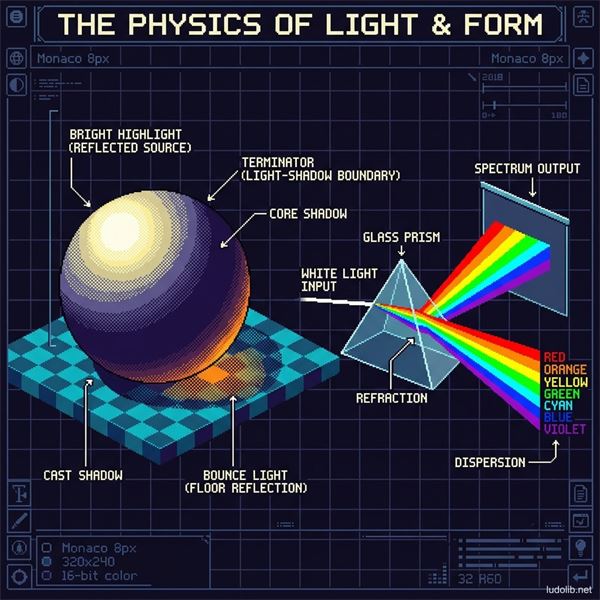 Illustration: A 3D sphere with technical lighting parameters (Highlight, Core Shadow, Bounce Light) and a prism splitting white light into the RGB spectrum.
Quick Summary
For Game Art and Computer Graphics, color is not a physical property of objects, but light itself. To create realistic 3D spaces or moving Concept Art, artists and graphics engineers must understand the nature of light — and how digital color systems (RGB, HSB) reconstruct human vision.
Art in games doesn’t stop at emotion. When you adjust a material slider in Unreal Engine, you are directly intervening in the physical laws of light.
1. The Physical Nature of Light and Color
To draw light correctly, one must first understand what light is.
☀️ Visible Spectrum
Isaac Newton proved that white light is actually the sum of all colors forming a rainbow band. The human eye can only see a very narrow band of electromagnetic wavelengths called the Visible Spectrum.
- The illusion of existence: An apple has no “red color.” The apple is composed of molecules capable of absorbing all light wavelengths (green, blue, yellow…) and only reflecting the red wavelength back onto our retinas.
- Darkness (Black): The state where an object completely absorbs 100% of incident light (no light bouncing back to the eye).
- White: The state where an object reflects back 100% of all light wavelengths.
In a Game Engine, when setting the Albedo or Base Color property of a material, you are precisely instructing the Engine to calculate the light reflection ratio of that object.
2. Core Color Models
Humans have created mathematical coordinate systems to represent color. Here are the 3 most important color models that define the game industry:
🖥️ Additive Color System (RGB — Red, Green, Blue)
This is the native language of every digital screen (phone, PC, TV) and also the computational language of Game Engines.
- Mechanism: Based on Emitted Light. Your screen is black until pixels emit light.
- Additive property: Mixing Red + Green = Yellow. Mixing maximum intensity of all three (Red, Green, Blue) produces White Light. Turning all three off produces Darkness (Black).
🎨 Subtractive Color System (RYB / CMYK)
This is the color system of traditional painting (Pigments) and printing. RYB represents Red, Yellow, Blue.
- Mechanism: Based on Reflected Light. You apply ink to white paper (reflecting 100% of light). That ink layer will absorb (subtract) light.
- Cancellation property: The more ink colors mixed together, the more light the paper absorbs. Mixing everything produces Black.
- Note: Despite working on computers (RGB system), Concept Artists often use the RYB color wheel in design thinking to create harmonious traditional color palettes.
🧠 Perceptual Color System (HSB / HSV)
While RGB is the language of machines, it is extremely counter-intuitive for humans (How does a human know what % Red and Green light to mix to get Brown?). HSB (Hue, Saturation, Brightness) was created to solve this problem. It breaks a color into 3 most understandable dimensions:
- Hue: What color is it? (Red, Orange, Green…). Located on the rim of the color wheel.
- Saturation: Is the color vivid or faded/grey?
- Brightness / Value: How much light is the color receiving? (Bright white or pitch black).
HSB is the essential “bread-and-butter” tool of every digital artist.
3. Simulating Light in Art
The ultimate goal of Game Art (especially in 3D graphics or realistic 2D painting) is to fool the player’s brain — making them believe that a 2D flat screen is actually a 3D deep space.
The only way to do that is to accurately simulate the collision of light.
🌗 The Supreme Law: “Value is King”
Value (light-dark intensity — the B in HSB) is the 100% decisive factor in how the brain perceives form.
- Rule: “Color creates emotion, Value creates form.”
- If a frame has incorrect Value arrangement, no matter how beautifully you choose the Hue, that frame will still look confused and flat. Every Master artist regularly converts their paintings to Grayscale to check Value.
🏓 Light Bounce (Bounce Light & Ambient Light)
Light in the real world doesn’t travel in a straight line and disappear. When light rays (Ray) hit the ground, they bounce up (Bounce) and hit the underside of objects.
- Core Shadow (Darkest zone): Not at the edge of the object, but at the boundary between the bright zone and the zone where bounced light is reflected.
- Ambient Light (Environmental light): Diffused light from the sky. Thanks to Ambient Light, even in the darkest crevice, an object is never 100% pitch black. This complex calculation is why Ray-Tracing technology consumes enormous amounts of hardware resources.
🧊 Shadow Color
The biggest mistake of beginners is using Black (or adding grey) to paint shadows.
- Shadows rarely have a plain grey color. They carry the color of Ambient Light (usually blue from the sky) mixed with the Complementary color of the main light source.
- Example: If the main light source is a blazing torch (Orange), the character’s shadow will carry an artistic cold blue/purple hue.