
🎨 9-Slice Scaling: The Secret to Responsive Game UI
Quick Summary
9-Slice Scaling (also known as 9-Patch in Android, or Scale9) is a 2D image rendering technique widely used in User Interface (UI) design for games. By dividing a texture into a 3x3 grid consisting of 9 segments, the system can stretch the image to any size while preserving the perfect aspect ratio and sharpness of the 4 decorative corners.
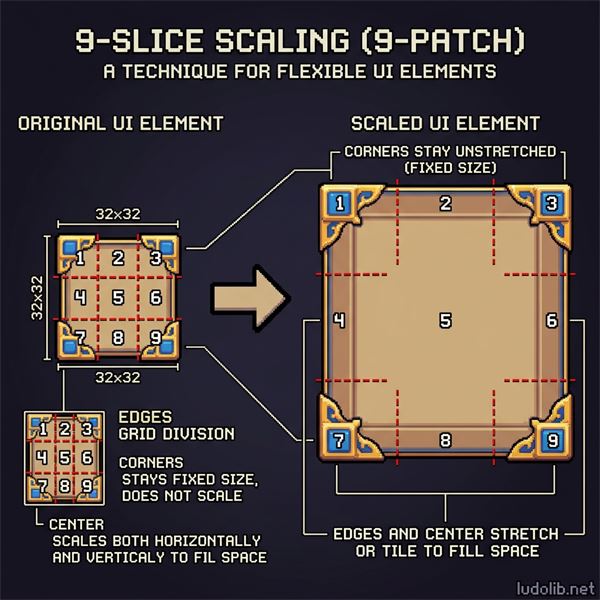 Illustration: A UI button is sliced into 9 segments by red grid lines. When the button is stretched to a massive size, the 4 corners retain their original shape without being distorted or pixelated.
1. The Problem with Standard Scaling
When a Game Artist designs a Button or a Panel with rounded borders or corner ornaments, they often face a problem: If the text inside is too long, the button must be stretched to fit it.
- If stretched normally (Uniform or Non-Uniform Stretch), the entire image becomes distorted: vertical borders become paper-thin, horizontal borders get flattened, and decorative corners get stretched out of proportion, looking extremely ugly.
- If the artist has to manually draw individual buttons of varying sizes for every possible text length, the game’s file size (Memory/VRAM) will skyrocket, and it will waste an immense amount of production time.
The perfect solution is 9-Slice Scaling.
2. How 9-Slice Works
This technique works by placing 4 slice lines (2 vertical, 2 horizontal) over the original image, dividing it into 9 distinct regions:
- The Four Corners: Segments 1 (Top-Left), 3 (Top-Right), 7 (Bottom-Left), 9 (Bottom-Right).
- Property: Keep their 1:1 aspect ratio. They are never stretched under any circumstances.
- The Left/Right Edges: Segments 4 (Left) and 6 (Right).
- Property: Only stretch or tile vertically (Y-axis). They do not stretch horizontally.
- The Top/Bottom Edges: Segments 2 (Top) and 8 (Bottom).
- Property: Only stretch or tile horizontally (X-axis). They do not stretch vertically.
- The Center/Core: Segment 5.
- Property: Stretches or tiles on both X and Y axes to fill whatever space is remaining.
3. Benefits in Game Development
This technique is supported by default in almost every modern Game Engine such as Unity (Image Type: Sliced), Unreal Engine (Box Margin), or Godot (NinePatchRect). The benefits are massive:
- Memory Optimization: You only need one incredibly small texture file (e.g., 32x32 pixels) to generate hundreds of massive UI panels of completely different dimensions.
- High Flexibility: The interface becomes highly responsive, adapting automatically to different screen resolutions (Mobile, PC, Console) or varying lengths of localized text without breaking the art style.
- Time Saving: Artists do not need to redraw borders for every single UI screen.
See Also
- Game Art — Foundational art concepts
- UI UX Design — Interface design principles
- Game Engine — Real-time rendering tools
References
- Unity Manual: 9-Slicing Sprites.
- Android Developers: Draw 9-patch tool.