
🎨 Anatomy of Light: Shaping Form in Game Art
Quick Summary
Anatomy of Light is a foundational concept in classical art and computer graphics that breaks down how light interacts with a 3D object (typically a sphere) into 6 or 7 distinct zones. Understanding and controlling these properties allows a Game Artist to transform a flat 2D circle into a deep, realistic, and convincing 3D form.
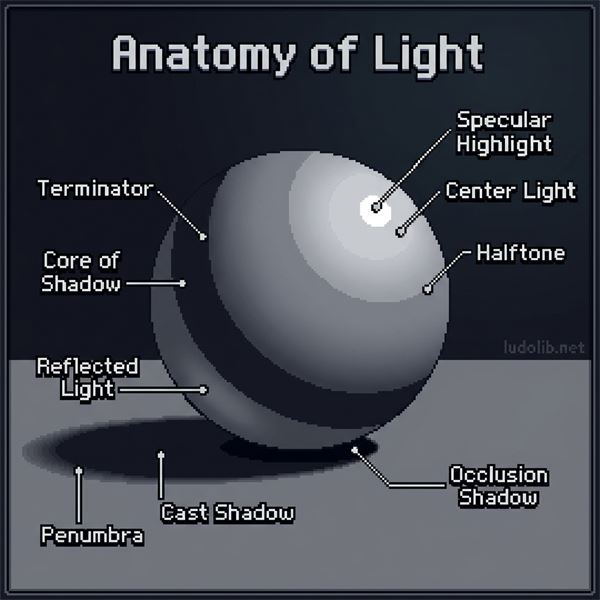 Illustration: The properties of light on a sphere — from the bright Specular Highlight down to the dark Core of Shadow and the Reflected Light bouncing up from the ground.
1. The Light Side
This is the area facing the primary light source (Key Light) directly. It consists of two main components:
-
Specular Highlight:
- A mirror-like reflection of the light source. It is most visible on smooth or wet surfaces.
- The glossier the material (like metal or wet plastic), the smaller, sharper, and brighter the highlight. Matte materials (like cloth or dirt) have very dull highlights or none at all.
-
Center Light:
- The brightest region of the halftone where the light source is hitting the surface most directly.
-
Halftone / Midtone:
- The full range of tonal values observed within the lit region of an object, where the brightness gradually falls off as the surface turns away from the light.
- This is where the object’s true color (Local Color) is most visible.
2. The Boundary
- Terminator Line: The dividing line where the light side ends and the shadow side begins.
- The harshness of the terminator depends on the light source: Hard light (noon sun) creates a crisp, sharp edge, while soft light (overcast sky) creates a smooth, gradient transition.
- On translucent materials, this is where the Light Scattering (Subsurface Scattering) effect occurs, often resulting in a highly saturated band of color.
3. The Shadow Side
This is the area the primary light source cannot reach. However, shadows are rarely pure black. They are broken down into:
-
Form Shadow:
- The entire shadowed side of an object.
-
Core of Shadow:
- The darker region of a form shadow, located right behind the Terminator line.
- It is the darkest because there is little or no reflected light reaching it, nor any direct light.
-
Reflected Light (Bounce Light):
- Light that bounces off the ground or surrounding objects and hits the shadowed side of the form.
- It usually carries the color of the environment (Ambient Color). Reflected Light helps define the silhouette of the object on the dark side, separating it from the background.
- Rule of thumb: Reflected Light is never brighter than the Halftone on the light side.
4. The Environment Interaction
-
Cast Shadow:
- A shadow projected by an object onto another surface when it blocks the light source.
-
Penumbra:
- The softening edge of a cast shadow as light and shadow begin to mix. Most visible in the furthest edges of a cast shadow.
-
Occlusion Shadow (Ambient Occlusion):
- These shadows appear where light has trouble reaching, such as any crevice, corner, or point of contact between forms (e.g., where the object touches the ground).
Application in Game Development
- Digital Painting: Concept artists must manually paint all 6 of these zones to trick the viewer’s brain into perceiving a 3D form on a flat 2D canvas.
- 3D Rendering & Game Engine: Systems using PBR (Physically Based Rendering) and Raytracing calculate this structure automatically. However, a Technical Artist must still set up materials and lighting correctly so the engine can accurately generate proper Core Shadows and Ambient Occlusion.
See Also
- Game Art — The foundational discipline
- Light Scattering — The effect occurring at the Terminator on translucent objects
- PBR (Physically Based Rendering) — The rendering system that simulates physical light behavior
- Game Engine — Tools that calculate Cast Shadows and Ambient Occlusion
References
- Sycra Yasin, How to Draw Form (Art Fundamentals).
- James Gurney, Color and Light: A Guide for the Realist Painter (2010).